All About Mobiles

http://www.infolinks.com/join-us?aid=2084565
Showing posts with label Android. Show all posts

cloudfone MANY PATTERN ATTEM DONE FREE TOOLS

cloudfone MANY PATTERN ATTEM DONE FREE TOOLS


PROCEDURE
PHONE MUST BE POWER OFF AND
HOLD VOLUME DOWN
HOME BUTTON
POWER KEY

INSTALL FAST BOOT DRIVER

OPEN MULTI TOOLS

TYPE NUMBER 8
AND HIT ENTER


SCREEN SHOT


DONE..THANKS FOR VIEWING
MULTI TOOL FREE TOOL
Hotfile.com: One click file hosting: Android Multi Tools_1.0 By azimbahar ( One-Man) Parvez.rar

CHERRY MOBILE FUSION BOLT NO POWER DONE

UNIT: C-M FUSION BOLT

PROBLEM STATUS: NO POWER


PROCEDURE

AND

instructions:


1.Install Nuclear Upgrade Tool Setup
2.Then Power Of Your Device
3.Press Volume + And Power On
4.Install Driver Located At Nuclear Upgrade Tool Folder
5.After Install Done Open Nuclear Folder Then Product Click Main APP
6.Select Your Firmware ,Recovery ,Misc,System Image
7.Then Click Download Or Flash.......
8.Wait Until Successful


FINISH PRODUCT


DOWNLOADABLE FILES
CHERRY MOBILE FUSION BOLT STOCK ROM FILES
cm_fusionbolt_stockrom - Download - 4shared - pinoy screencast

FLASHING TOOL
Dev-Host - Firmware Update Tool for Ainol Novo 10 Hero II(1).rar - The Ultimate Free File Hosting / File Sharing Service

JELLY BEAN 4.2.2 BETA
Dev-Host - 130407(T0403)_1720_novo7_venus_4.2.rar - The Ultimate Free File Hosting / File Sharing Service

DON'T FORGET TO HIT BUTTON

THANK YOU FOR VIEWING

LG E400 ENTER CODE PROBLEM [DONE]HARDRESET

LG E400 ENTER CODE PROBLEM [DONE]HARDRESET

NAIS KU LNG TU IBAHAGI KAHIT COMMON TRICKS NA ITO

PROCEDURE INSIDE THE PICTURE


Easy Wipe Rom A13/10 Chipset

Easy Wipe Rom A13/10 Chipset


software pack:


*one click pattern lock remover on android tablet
*one click fix android tablet hang logo
*one click reboot into recovery
*one click reboot into fastboot mode
*one click wipe data fastboot mode [pwede sa mga china phone]
*adb driver include

Note:

this will be applicable on unit with enabled adb on settings

How to Perform Wipe?

*connect phone into USB/PC
*install drivers if needed
*go to device manager if adb driver must be installed properly
*open Easy Wipe Shell
*press Exit Pattern Lock [ cmd command will be display blink ]
*press reboot device and your done.


How to Perform Wipe China Phone wihout Reset Combination?

phone needs to turn into fastboot mode [volume up + power]
*connect phone to USB/PC
*install drivers if needed
*press fastboot erase
*press reboot fastboot


software is free so please DO IT ON YOUR OWN RISK


download here

[ROOT]How to root Samsung Galaxy tab 2 (p3100) android 4.2.2

Hi

Step by Step instructions on:


  1. Download this file
  2. extract it
  3. run odin
  4. select tar file in pda
  5. and flash it
  6. finish

Now your phone is root for test download root checker

IF YOU WANT MAKE A SAMSUNG S3(i9300)BOOT CARD(LOOK HERE)

1)DOWNLOAD THIS FILE
2)EXTRACT ON DESKTOP
3)TAKE ONE MICRO SD CARD ALSO ONE CARD READER(SD MUST 2GB OR ABOVE)
4)INSERT THE CARD READER HOLDER THEN CONNECT USB PORT
5)OPEN THE Diskdump2.exe
6)SELECT GENERIC STORAGE DEVICE

7)AFTER THE SELECTION NEW WINDOWN APPER
8)USE WRITE BY SCRIPTS OPTION(4th Option)

9)WAIT FOR THE FINISHING
DONE YOU SUCESSFULY MAKE A SAMSUNG BOOT CARD


DOWNLOAD

easy wipe rom a10/a13

WIPE_ROM EASY A10 - A13


software pack:

*one click pattern lock remover on android tablet
*one click fix android tablet hang logo
*one click reboot into recovery
*one click reboot into fastboot mode
*one click wipe data fastboot mode [pwede sa mga china phone]
*adb driver include

Note:

this will be aplicable on unit with enabled adb on settings


How to Perform Wipe?

*connect phone into USB/PC
*install drivers if needed
*go to device manager if adb driver must be installed properly
*open Easy Wipe Shell
*press Exit Pattern Lock [ cmd command will be display blink ]
*press reboot device and your done.


How to Perform Wipe China Phone wihout Reset Combination?

*phone needs to turn into fastboot mode [volume up + power]
*connect phone to USB/PC
*install drivers if needed
*press fastboot erase
*press reboot fastboot

software is free so please DO IT ON YOUR OWN RISK


here download

Android Mobile Secret Codes


(1) *#*#4636#*#* - this code Shows Phone information, Battery information, Battery history and Usage statistics etc


(2) *#*#8255#*#* - this code Show GTalk service monitor


(3) *#*#1111#*#* -this code show Service Mode


(4) *#*#232331#*#* -this code use s Bluetooth test


(5) *#*#3264#*#* - this code show RAM version


(6) *#*#0588#*#* - this code show Proximity sensor test


(7) *#*#2664#*#* - this code show Touch screen test


(8) *#*#0842#*#* - this code show Vibration test


Android 2.3 Mobile Secret codes


(1) *#*#0*#*#* this code use screen test menu


(2) *#0011# show to network mode/cell info/power info hidden menu


(3) *#*#4636#*#* sow to battery and other general setttings like GSM/CDMA


(4) *#*#8255#*#* for Gtalk service monitor


(5) *#*#7780#*#* for factory data reset


(6) *#*#34971539#*#* for information about phone camera (be very careful hitting options here)


(7) *#*#7594#*#* change the "Power" button action in your phone.


(8) *#*#197328640#*#* service mode


(9) *#197238640# service mode


(10) *#0*# testing mode


(11) *#1234# display phones current firmware


(12) *#*#1472365#*#* gps test (work on 2.2)


(13) *#0011# network mode/cell info/power info


(14) *#*#0*#*#* screen test menu


(15) *#7465625# engineering mode


(16) *#3214789650# gps service menu for JP3 fw


(17) *#9900# Sysdump screen.. way to dump ram and other logs to sd card


(18) *2767*3855# FACTORY DATA WIPE AND internal SD RESET as soon as you enter # use only if you want wipe your phone


(19) *#*#273283*255*663282*#*#* Opens a File copy screen where you can backup your media files


Note: We will not be responsible for any damage of your phone,no will be liable for any damage


Touchmate U-Tab (TM-MID785) Pattern Lock Done Thru Flashing

share ko lang po mga boss Touchmate U-Tab (TM-MID785) Pattern Lock Done Thru Flashing

actually u cant reset it but u can flash it with TM-MID760 flash file and it will suit ur model TM-MID785...below is the website u can download the software with flasher.

download here:
Touchmate

Once downloaded the file
steps:
1. switch off ur tablet by long press power button
2. open rk768 folder and open rockchip tool
3. for english version bottom left buttom and tick the second option
4. now select the .img file
5. this is very important how we connect the tablet to the computer so the tool recogonize it as downloading mode....press and hold menu key then connect usb cable then immediately press power button 5 to 6 or 10 times quickly..if u r running win xp then it will ask for driver (drivers are located in rk768 folder rockusb) select the driver and install it now u can see green light on rockchip tool saying connected device no.1...it means u r connected in download mode successfully...if u fail to connect dont worry try 1 or 2 times the same procedure it will work for sure until u have and hardware issue.
6. that's it now press upgrade button and wait till process complete now ur tab should work.

Note: U have to select the usb driver manually hope all know that method...if not please search it on google i dont have any pics right now.


Done...

How To: Install ADB and Fastboot on your Windows computer for use with your Android p

How To: Install ADB and Fastboot

Anyone that has ever tried to mod their Android phone has come across users telling other users to run various different ADB and/or Fastboot commands. The only problem is the average Joe has no idea what ADB and Fastboot are because, well, they aren’t your run-of-the-mill applications. I was completely lost myself when I first ventured into the world of Android. Hopefully this guide makes it simple and straightforward to get ADB and Fastboot installed on your computer.

WHAT ARE ADB AND FASTBOOT AND WHY DO I NEED THEM


ADB stands for Android Debug Bridge, while Fastboot stands for, well, Fastboot. Without going into too many technical details (trust me you don’t want technical details), let’s just say they are two command-line tools used when modding/hacking Android phones.

You need ADB and Fastboot if you are one of those people that like to mod/hack your Android phone. While many mods/hacks are now becoming more main-stream-user friendly with GUIs (i.e. they no longer require users to use ADB or Fastboot), there are still times when users need to use ADB and/or Fastboot. (Anyone with a Google Nexus One or Nexus S knows what I mean.) While you may not necessarily ever use ADB or Fastboot (depends on what phone you have, and the type of developer support it gets), it is always nice to have them installed when the time comes that you do need them.

INSTALLING ADB AND FASTBOOT

Installing ADB and Fastboot is actually very easy:

The following guide is for Windows PCs only, but ADB/Fastboot can be installed on Linux and Mac OS X also. (You just do it differently for Linux/Mac OS X.) Also note that this guide was written on a Windows 7 computer. However, the guide will work on Windows 8/XP/Vista the same way; I don’t know about earlier versions of Windows.

http://dottech.org/downloads/adb_fas...ther_tools.zip
(11 MB) ADB, Fastboot, and other tools.


Note: The tools found in the download are provided by Google, found in Android SDKhttp://developer.android.com/sdk/index.html. I have simply extracted the tools and uploaded them for easy access, instead of telling everyone to download the whole SDK. You can get the same tools if you download the Android SDK directly from Google.
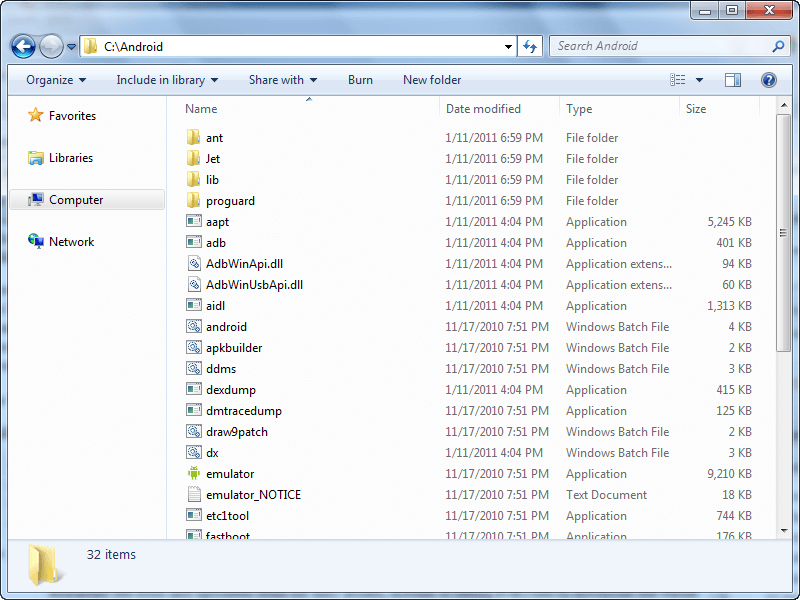
Extract the contents directly into your C:\ partition. You should now have a folder C:\Android that looks something like this:


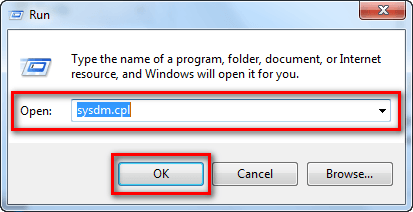
Press Win + R on your keyboard to bring up the Run dialog.
Once the Run box is open, type in sysdm.cpl and hit OK:


Once you hit OK, the System Properties panel should open; click on the Advanced tab:


From the Advanced tab click on Environment Variables:


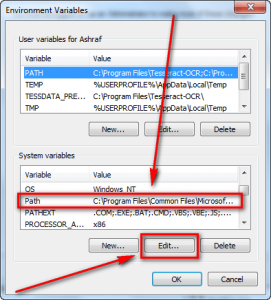
At the Environment Variables window find where it says Path under System variables, click on it, and click the Edit button:


When the Edit System Variable window pops up, type in ;C:\Android at the very end and hit OK:


Make sure you type in exactly ;C:\Android (be sure to include the semi-colon at the beginning).

After clicking OK, close out all windows. You are done!

USING ADB AND FASTBOOT

Once you have them installed, using ADB or Fastboot is as easy as opening command prompt, typing in adb xxx or fastboot xxx (with xxx being the command you want to run)…


nd hitting Enter on your keyboard to execute the command.

Take note, however, installing ADB and Fastboot is not enough to start using it with your phones. You need to install the relevant drivers on your computer – so your PC recognizes your phone – before ADB or Fastboot will be able to work with it. If you don’t have any drivers installed, you will get an error similar to the following:


If you don’t have the proper drivers installed, read dotTech’s article on[Android] Downloads links for USB (adb and fastboot) drivers for Windows for all Android phones and tablets | Reviews, news, tips, and tricks | dotTech

HTC HD2/Leo Update & English Language Change Done :)

HTC HD2/Leo Update & English Language Change Done

Fast I Do HSPL
( Must Need )
Do Search To Google For HSPL
Then I Do Flash With WWE & Indian Rom
Update Done But Given Problem
Code:
Your Os Rom Isn,t Customize For Your Hardware .
Please re-flash the Proper ROM Code Or Contact The Service Center
How To Solved This Problem
(If You Get)

You Need Flash With Original Rom , Mean Same Carrier/Operator Rom

Example -
I Get A Denmark Phone
After Update With Indian Rom Update Done But Given This Problem
Code:
Your Os Rom Isn,t Customize For Your Hardware .
Please re-flash the Proper ROM Code Or contace The Service Center
Code:
RUU_Leo_S_hTC_Asia_India_3.14.720.3_Radio_15.42.50  .11U_2.15.50.14_LEO_S_Ship.exe
Then I Flash With Denmark Rom Phone Go On Back Condition

Denmark: (DAN) 3.14.403.2 - Direct Link 1


Now I Need Change Language

So I Use World Wide English (WWE) 3.14.405.2 - Direct Link 1

Now Update And Language Change Done

Phone Full Working


Here is the new official 3.14 roms for the following contries:
Code:
3.14.xxx.x ROMS:
World Wide English (WWE) 3.14.405.2 - Direct Link 1
Denmark: (DAN) 3.14.403.2 - Direct Link 1
Sweden: (SVE) 3.14.413.2 - Direct Link 1
Norway: (NOR) 3.14.409.2 - Direct Link 1
France:(FRA) 3.14.406.2 - Direct Link 1
Spain: (SPA) 3.14.412.2 - Direct Link 1
Italy: (ITA) 3.14.408.2 - Direct Link 1
Portugal: (PTG) 3.14.410.2 - Direct Link 1
Greek: (ELL) 3.14.482.2 - Direct Link 1
Germany: (GER) 3.14.407.2 - Direct Link 1
Netherlands: (NLD) 3.14.404.2 - Direct Link 1
Turkey: (TUR) 3.14.468.2 - Direct Link 1
East Europe: (WWE_EastEurope) 3.14.479.2 - Direct Link 1
Hong Kong: (HKSCL_WWE) 3.14.831.3 - Direct Link 1
Russian: (RUS) 3.14.411.2 - Direct Link 1
Chinese: (HKCSL_CHT) 3.14.832.3 - Direct Link 1
Indian: (Asia_India) 3.14.720.3 - Direct Link 1

Vodafone: (UK) 3.14.161.3 - Direct Link 1
Vodafone: (DE) 3.14.162.5 - Direct Link 1
Vodafone: (NL) 3.14.172.3 - Direct Link 1
Vodadone: (SPA) 3.14.164.4 - Direct Link 1

T-Mobile: (GER) 3.14.111.1 - Direct Link 1


OS: Windows Mobile 6.5 Version ??
Rom: 3.14.xxx.x
Radio: 2.15.50.14
Manila: 2.5.??

------------------------------------------

Android Tool V1.1 Released

Android Tool V1.1

By
Dawood1208


-----------------------------------------------------------------

Screenshots

-------------------------------------------------------------------


-----------------------------------------------------------------

Update Log

-----------------------------------------------------------------


Thx to all who dawood1208 me names in about button
Donate if you like it :-]
More To Come

---------------------------------------------------------

Download

---------------------------------------------------------

S5360 too many pattern attempts Done

History: nilagayan ng pattern lock
Tools: magic hand..
Action taken:
press Vol. + Home button & power button


Done

HTC One ( Too Many Patter Attemp Or Pin Lock) Done

Model: HTC One

Problem:
Too Many Pattern Attemp

Solution: Hard Reset


Procedure:


1.Press And Hold The Volume Down And Press Power On,,,,
2.Wait Until Tree Anroid Image Appear Then Release POwer And Volume Down
3.Press Volume Down To Select Factory Reset The Press Power Button To Enter
4.Wait Until Phone Restart To Normal And Done,,,

Note: All DaTa From Phone Will Be Erase Or Delete

[Firmware Collection] All Wintouch Firmwares, Flasher & Tools Download Here

Hi,
Looks like this brand has many followers here so though about creating a good database of firmwares and tools.

I'll Start With

Wintouch Q75


Download Firmware From Here


Download Flasher From Here 

Wintouch Q75s


Download Firmware From Here


Download Flasher From Here

Wintouch M76


Download Firmware From Here


Download Flasher From Here

Wintouch M79


Download Firmware From Here

Download Flasher From Here

Wintouch Q74


Download Firmware From Here


Download Flasher From Here

Wintouch Q73


Download Firmware From Here


Download Flasher From Here


Wintouch Q79


Download Firmware From Here


Download Flasher From Here

All About Mobiles Headline Animator

Related Posts Plugin for WordPress, Blogger...
FeedReader button