All About Mobiles

http://www.infolinks.com/join-us?aid=2084565
Showing posts with label Samsung Galaxy Y S5360. Show all posts

Nemesis titanium a super custom rom for galaxy y s5360

AFTER IMMENSE POPULARITY OF NEMESIS ONE AND PHOENIX HERE IS THE NEMESIS TEAM BACK AGAIN WITH A AWESOME NEW ROM
NEMESIS TWOTM[codename~TITANIUM]
ROM IS BRACED WITH A AWESOME UI THAT IS COOLER AND MUCH COLORFUL THAN EVER!
IT IS NOT LIKE JELLYBEAN.......BUT IT IS LIKE "NEMESIS"[UNIQUENESS REDEFINED]
VIBRANT COLORS....UNIQUE THEME.......SIMPLY COOL!
AN AWSOME UI.
SIMPLE-ELEGANT-UNIQUE
NEMESIS2 HAS A UI THAT YOU WILL NEVER FORGET......SOMETHING ALL WILL LOVE!
FIRST EVER UI TO COMBINE MONOCHROME+VIBRANT COLORS IN A UNIQUE COMBO!
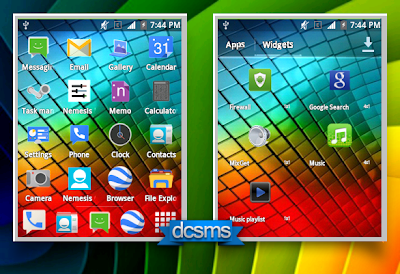
AN AWESOME NEW LAUNCHER WITH NEW VIBRANT ICONS!!
SMOOTH-FAST-VIBRANT!

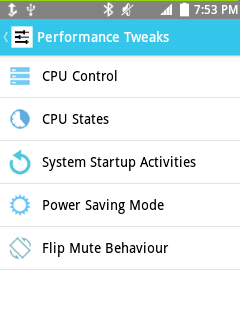
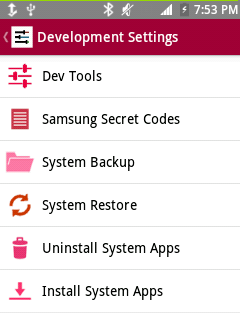
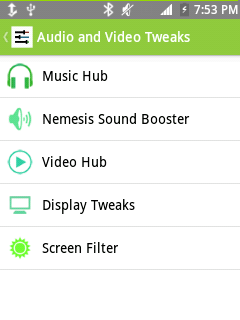
ALL NEW NEMESIS HUB!
ALL THE NECESSARY APPS AND TWEAKS AT ONE PLACE!
PARANOID ANDROID LIKE DIFFERENT TITLE COLOUR!
EVERYTHING YOU WILL EVER NEED FROM UI TWEAKS TO SUPPORT ALL INTEGRATED IN ONE PLACE!
JUST START THE APP AND GET IT ALL!
ALL NEW SYSTEM UI!
ALL NEW LOOKS!
MONOCHROME ICONS WITH VIBRANT TOGGLES!
IT's NOTHING LIKE ANYTHING(YEP,its TITANIUM )
++KERNEL FREE-SO NOW YOU ARE FREE TO USE ANY KERNEL++
++WITHOUT COMPATIBILITY PROBLEMS!!!++
LOW RAM USAGE-GIVES YOUR PHONE SOME MORE SPACE TO BREATH WITH ALL THOSE HEAVY APPS!
INSTALLATION INSTRUCTIONS:

First you need to root your device then continue...

1. Download NEMESIS TWO TITANIUM ZIP from here: Dev-Host - NEMESIS_TWO_TITANIUM_SIGNED.zip - The Ultimate Free File Hosting / File Sharing Service
2. Place the downloaded zip to your sdcard (not inside any folder).
3. Switch off your phone.
4. Now press volume up, home and power button together until the Android recovery shows up.
5. Select Wipe Data. Then select wip cache. Choose "Yes" both times.
5. Select: Update zip from SD Card.
6. Navigate with the volume buttons, and choose Nemesis Titanium Zip with your home button.
7. Choose "Yes" again. Installing wil start.
8. When done, you will be asked to reboot your phone.
9. Go back to the main menu and reboot.
10. Enjoy!!!


Please report bugs if any. The team will be happy to update you with bugfixes in the form of OTA updates.


KNOWN BUGS AND FAQ:


1. Mobile network not working.


Reset your APN.

Go to mobile data -access point -press left button -reset to default

Done.

2. Settings app has weird titlebars
Hehe, sorry about that, that's a graphic error, will fix soon.

3. Some options in Nemesis Hub force close.
Again, that's something we're fixing, expect an update soon.

4. I hate colors.

Well, it's time to try out something fresh and new. Otherwise try out the thousands of other roms that,

unfortunately, look the same.


5. Nice Rom! Smooth and fast!
Well thank you!

6. Can I use xxxx kernel?
This Rom is kernel free, so use any kernel you want. In case of Kernel issues, clarify with the kernel dev.

7. XXXX app is isn't working!
Ask the developer of the app.

8. I hate some things in the Rom, can I change it?
Of course! Nemesis 2 is free for anyone to modify. But if you want to publish your work, please do so in our

forums ONLY.

Disclaimer : Do it your phone at your risk. I will not be responsible for any problem in damage your phone .

Thanks Nemesis Team  
UPDATES AND OTA's

  • YOUR FAVORITE OWNER PIC CHANGER NO LONGER REQUIRES QUICPIC!!! HEAD OVER TO LINK BELOW AND DOWNLOAD IT!

Odin Guide on How to Flash and Install stock ROM Firmware on Samsung Galaxy Y S5360

How to use Odin in flashing the stock ROM on Samsung Galaxy Y S5360?

Here's the procedure on how to manually install the stock ROM (firmware) on Samsung Galaxy Y GT-S5360. Flashing stock ROMs is useful in downgrading or upgrading to any available firmware versions you desired. This has been also useful for unbricking purposes for a bricked, reverting back to original stock or if you needed your device warranty back.

This guide is a bit risky for beginners and can only be used by advance users who already had an experience on how to tweak android devices firmware.
Now, this procedure is no joke and should be taken seriously  for it might results to damage your phone if some mistakes might happen. We are talking about firmware flashing here, one false move or any interruption will take your device into serious situation that is not too easy to recover.Your phone is not a toy for us, but it is your personal property, you are the only one who can decide on what to do about it.


 Disclaimer: We shall not be held responsible if anything happens to your device by following this guide. Proceed at your own risk!
Needed files and tools
Stock ROM - See list of Samsung Galaxy Y S5360 stock ROMs below (extract the file after downloading)
Odin Multi-downloader - Odin3_v1.84
PIT file - totoro_0623.pit
Driver - You need to install Kies or get the driver of your phone if you have no Kies previously installed.
USB cable - use the supplied USB cable of your Galaxy Y. (Odin will not work in Mac and Linux OS).
PC or laptop - running on Windows or later OS.
Your Phone - Samsung Galaxy Y GT-S5360

Preparation before Flashing
Back-up all of your important data stored in the phone like contacts, messages and etc. Flashing will wipe and delete all of it.
Ensure that your phone is fully charge or above 80% charge. (If your phone had an auto-shutdown history, and its too old, use a newer or good working battery.
Remove the SIM card and the external memory card. (not necessarily but recommended to avoid any certain issues)
Disable and Close Antivirus, Kies and any running software windows.
Hard Reset - We often do hard reset before flashing to clean the memory cache of the phone. Master reset code *2767*3855# .

ODIN Flashing Procedures for Samsung S5360 Galaxy Y
1. Run the ODIN Downloader v1.84 on your PC desktop.
2. Load the firmware binary files on each designated button spaces.

How to Flash with Multiples files with Pit, Bootloader, PDA, PHONE/MODEM and CSC file
This is full flashing and useful for unbricking for it has a full packaged with individual file allocations, this type of files we often used to fix a bricked Samsung Android devices. Some firmware updates have like this one and some are came into just a single file packaged.

Click on each button and load the appropiate file unto it.
Pit Button - select and load the totoro_0623.pit 

Bootloader - look for the file with the word Boot,
like DefaultCalDataWithBoot_S5360XXXXX_REV05.tar.md5

PDA button - look for the file with the letters PDA or CODE on it,
like PDA_S5360XXXXX_REV05.tar.md5

PHONE button- look with the word MODEM file,
like MODEM_S5360XXXXX_REV05.tar.md5

CSC button - associated also with letters CSC or Multi_CSC,
like GT-S5360-MULTI-CSC-OXXXXX.tar.md5

There are three checkboxes on the left side of ODIN, the Re-Partition, Auto Reboot and F.Reset Time.
The Auto Reboot and F.Reset Time are often always checked in flashing while the Re-Partition will only be checked if you want to fix the memory partition of the phone, now if you'll only want to upgrade or downgrade DO NOT CHECK THE REPARTITION.

DO NOT CHECK RE-PARTITION - Safety for Upgrade and Downgrade
Samsung Galaxy Y S5360 firmware update Odin flashing without Re-Partition

Full Flashing with RE-PARTITION enabled - Advisable only for fixing Soft bricked devices
Samsung Galaxy Y S5360 firmware update Odin flashing with Re-Partition

How to Flash with Only a Single file.
Some files came only in a single packed like with tar.md5 file extension., and a 'SS_DL.dll' file also included on it. Others are confused where to put this file. Well, the S5360XXXXX_S5360XXXXX_S5360XXXXX_HOME.tar.md5 goes to the PDA button section while the 'DLL' file in not to be used but don't delete it, a dll file means a driver.
Again the "Repartition" check-box is not to be tick, only the Auto-Reboot and F.Reset Time are checked.

Note: One packaged file will not tend to work with available Odin version for now but the complete packaged will work. For those who are looking on how to revert back your devices back to official stock or fixes softbricks and bootloops you can use this following bundled stock ROM  packaged below.

Samsung Galaxy Y S5360 Odin Flashing single file stock ROM firmware

Setting up the Samsung Galaxy Y into Download Mode and Connecting to PC.
You need to set the device into download mode in order to let Odin recognize it. To set into download mode
Turn OFF the phone, then hold and press the three buttons Volume Down + Home + Power Key simultaneously. If you'll still not get into download mode, remove the battery a couple of seconds then put it back again and then press the download mode button combination again.

Samsung Galaxy Y S5360 Download mode buttons

Once the phone displays the Android robot and says "Downloading..." Connect the phone to PC with the supplied USB cable. Odin will automatically recognize it if it's properly connected, the ID:COM mapping will highlight to color yellow and says "added" on the log box.

Start Flashing
Hit the "Start" Button when all are set perfectly to begin flashing.
Samsung Galaxy Y S5360 Odin Flashing


CAUTION: Avoid touching the phone while the flashing already started, any interruption will result into serious issues like soft-brick or hard-brick.

Let the flashing completes, a progress bar displays until the firmware downloading process finishes. It only takes around 3 to 5 minutes, depends of your PC speed.
When a word "PASS" appears, it means that the flashing is successful. The phone will then reboot and after completely rebooted it is then safe to remove it from computer's connection.
Samsung Galaxy Y S5360 Odin successful flashing

Do a hard reset again by the code *2767*3855#  or in recovery mode hold and press Volume UP+Home+Power key. Navigate to the Wipe Data cache/Factory Reset.
Some other tweaks:
1) To check your  recent firmware info *#1234#
2) CSC configuration - IMEI number check [*#06#]
3) *#272*[IMEInumber]#
4) Choose sales code

Odin Flashable Bundles that Works for Samsung Galaxy Y by Doky73
These are rebundled Samsung Galaxy Y firmwares by XDA-Developer highly recognized member Doky73 that are100% tested and perfectly works on Samsung Galaxy Y S5360 odin flashing.

(format: PHONE / CSC / MODEM versions)


European multilanguage build.
based on: S5360XXKL3_S5360OXXKL1_RST_S5360XXKL3_HOME.tar.md5
ro.build.date=Wed Dec 14 17:16:14 KST 2011
Supported languages:
XX = de,en,es,fr,hu,it,nl,pt(cs,da,el,fi,no,pl,sl,sv,tr )
Included CSCs: (Default is XEU)
ATO AUT COS CPW CYO CYV EIR EUR FOP ITV MOO PAN PHE SUW TPH XEF XEH XEO XEU XEZ XSK
After the flash, set your country/provider in dialer *#272*[yourIMEI]# (-> It will wipe your data, and rebrand the phone to specific country/carrier)
This build does not have any provider specific bloatware.

This is an OXF CSC file only!!!
included regions:
CNX COA ERO GBL MOT MSR MTL PMN SIM TMT TOP TRA
The pack includes region specific settings, and Swype keyboard for the following languages:
EnglishUK, EnglishUS, Bulgarian, Croatian, Danish, Dutch, Finnish, French, German, Korean, Norwegian, Romanian, SerbianLA, Slovenian, Swedish
You may use other parts of S5360_XXKL3_OXXKL1_XXKL3 from above!

Vodafone Hungary branded
based on: S5360XXKK6_S5360VDHKK1_S5360XXKK5_HOME.tar.md5
ro.build.date=Wed Nov 23 21:52:07 KST 2011
Supported region: VDH only

Indonesia, Malaysia, Philippines, Singapore, Vietnam
based on: S5360DXKL2_S5360OLBKL2_S5360DXKL2_HOME.tar.md5
ro.build.date=Thu Dec 15 19:22:01 KST 2011
Included CSCs:
GLB MM1 SIN SMA STH THL XEV XME XSE XSP XTC XTE
Included languages:
DX = en,id,ms,th,vi,zh(ta)
This build contains some provider specific bloatware, depending on your CSC selection.

European multilanguage build.
based on: S5360XXLA2_S5360OXXLA2_RST_S5360XXLA2_HOME.tar.md5
ro.build.date=Wed Jan 11 13:58:09 KST 2012
Supported languages:
XX = de,en,es,fr,hu,it,nl,pt(cs,da,el,fi,no,pl,sl,sv,tr )
Included CSCs: (Default is XEU)
ATO AUT COS CPW CYO CYV EIR EUR FOP ITV MOO PAN PHE SUW TPH XEF XEH XEO XEU XEZ XSK
After the flash, set your country/provider in dialer *#272*[yourIMEI]# (-> It will wipe your data, and rebrand the phone to specific country/carrier)
This build does not have any provider specific bloatware.

Indonesia, Malaysia, Philippines, Singapore, Vietnam
based on: S5360DXLA1_S5360OLBLA1_S5360DXLA1_HOME.tar.md5
ro.build.date=Thu Jan 12 20:25:01 KST 2012
Included CSCs:
GLB MM1 SIN SMA STH THL XEV XME XSE XSP XTC XTE
Included languages:
DX = en,id,ms,th,vi,zh(ta)
This build contains some provider specific bloatware, depending on your CSC selection.

India
based on: S5360DDLA3_S5360ODDLA2_S5360DDLA2_HOME.tar.md5
ro.build.date=Wed Jan 18 17:46:48 KST 2012

Included CSCs:
ETR INS INU NPL SLK TML
Included languages:
DD = en(hi)
This build does not contain provider specific bloatware.
(some SD card issues reported with this build -> I suggest to format your SD to FAT32)

Chile
based on: S5360LUHKL1_S5360CHLKL1_S5360LUHKL1_HOME.tar.md5
ro.build.date=Thu Dec 1 15:02:14 KST 2011
ro.build.version.release=2.3.6

Included CSCs:
CLH
Included languages:
UH = en,es
This build contains some provider specific bloatware.
(please note, not tested yet. Pls report if it's OK or not!)

Brazil
based on: S5360BUTKI3_S5360ZTAKI3_S5360BUTKI3_HOME.tar.md5
ro.build.date=Thu Sep 22 13:27:09 KST 2011
ro.build.version.release=2.3.5

Included CSCs:
ZTA
Included languages:
UT = en,es,pt
This build contains some provider specific bloatware.
(please note, not tested yet. Pls report if it's OK or not!)

You can also request a rebundled stock ROM directly to Doky73 on his original thread here.

S5360DDLA1 India Samsung Galaxy Y S5360 Android 2.3.6 Gingerbread Firmware Upgrade

Users of Samsung Galaxy Y GT-S5360 in India will be getting the Android 2.3.6 Gingerbread update. The new firmware build number S5360DDLA1 is already spotted on Samsung firmware server and will be going officially rolled out anytime now. This is an update from previous build S5360DDKK1. Since this update is still in 2.3.6, just expect  no more major changes might take effect, this update might just add more enhancement, better performance possibly and a stable Gingerbread experience for Galaxy Y.

Firmware info:
PDA: S5360DDLA1
PHONE: S5360DDLA1
CSC: S5360DDLA1
KERNEL: 2.6.35.7 dpi@DELL170#1
Version: Android 2.3.6 Gingerbread
Build: January 2012

The original and unmodified S5360DDLA1 stock ROM is now also available for download. via sammobile Samsung Galaxy Y GT-S5360 Asia firmware page.
GT-S5360_ODD_S5360DDLA1_S5360ODDLA1
Password: samfirmware.com
 
Stock firmware S5360DDLA1 Odin installation: for advance users who prepared Odin instead of  Kies.

S5360DDLA1 Android 2.3.6 Gingerbread stock ROM download

Upgrade only: Load each specific file on each designated button slots.
Bootloader: BOOT_S5360DDLA1_REV05.tar.md5
DefaultCalDataWithBoot_S5360DDLA1_REV05.tar.md5 (Use this one)
PDA: PDA_S5360DDLA1_REV05.tar.md5
Phone: MODEM_S5360DDLA1_REV05.tar.md5
CSC: GT-S5360-MULTI-CSC-ODDLA1.tar.md5
DO NOT check 'Re-Partition ' checkbox'
Install S5360DDLA1 Android 2.3.6 Gingerbread stock ROM in ODIN
Full flash: from any unofficial ROMs, fixing previously softbricked and also to those who struggle to revert back to original India firmware because of flashing the wrong firmware version from other region. Just add the pit file unto it. Then load the Default bootloader, PDA, Phone and CSC md5 file.

PIT button: totoro.pit  
"Check the "Re-Partition checkbox"
Revert, Unbricked, recover, Install S5360DDLA1 Android 2.3.6 Gingerbread stock ROM in ODIN
Check out the full detailed step by step procedure on how to flash Samsung Galaxy Y using Odin.

All About Mobiles Headline Animator

Related Posts Plugin for WordPress, Blogger...
FeedReader button