
Showing posts with label iphone 3gs. Show all posts
Showing posts with label iphone 3gs. Show all posts


Iphone 3gs sucessfully restored 5.1.1 step by step
Iphone 3gs sucessfully restored 5.1.1 step by step.
Step 1:Extract redsn0w_win_0.9.15b3.zip file.
Step 2:Run as administrator redsn0w_win_0.9.15b3.exe.
Step 3 ress “Extras”
Step 4:Now you have to choose the “Even more”
i
Step 5:Now you have to choose the “Restore”

Step 6:Now connect your iphone 3gs with system.
step 7:Tap on IPSW and select the iOS iPhone2,1_5.1.1_9B206_Restore
IPSW form your computer.

Step 8:Click “Yes”

Step 9:Put Your device into DFU mode
(or use the Steps below)

Hold down power button and home button both at the same time for
10 seconds
After the 10 seconds release the power button and still pressing on the
home button for another 10 seconds.


Step 10:wait for restore iphone sucessfully...

Step 11:Now click back for jailbrake you have to choose the “Select IPSW”&
choose iOS iPhone2,1_5.1.1_9B206_Restore IPSW form your system.

Step 12:Select “ok”&“Yes”&click “jailbreake”& install “Cydia”& click next for
wait done.

Step 13:upadte “Cydia” & install “Ultrasnow” file.Wait for Signal 1 min & go
Step 1:Extract redsn0w_win_0.9.15b3.zip file.
Step 2:Run as administrator redsn0w_win_0.9.15b3.exe.
Step 3
ress “Extras” Step 4:Now you have to choose the “Even more”
i
Step 5:Now you have to choose the “Restore”
Step 6:Now connect your iphone 3gs with system.
step 7:Tap on IPSW and select the iOS iPhone2,1_5.1.1_9B206_Restore
IPSW form your computer.
Step 8:Click “Yes”
Step 9:Put Your device into DFU mode
(or use the Steps below)
Hold down power button and home button both at the same time for
10 seconds
After the 10 seconds release the power button and still pressing on the
home button for another 10 seconds.
Step 10:wait for restore iphone sucessfully...
Step 11:Now click back for jailbrake you have to choose the “Select IPSW”&
choose iOS iPhone2,1_5.1.1_9B206_Restore IPSW form your system.
Step 12:Select “ok”&“Yes”&click “jailbreake”& install “Cydia”& click next for
wait done.
Step 13:upadte “Cydia” & install “Ultrasnow” file.Wait for Signal 1 min & go


Iphone 3gs full short or dead solution 100% tested
.:: Iphone 3gs full short or dead change this marked IC ::..


i Phone 3GS Solution for no vibration on i
Argh, seems like iPhone 3GS has issues with is vibrator. For some mysterious reason, my iPhone stopped vibrating, Although some people blamed the missing vibration problem on firmware issues, however already I had the most recent firmware on.
Then I stumbled upon this tip which pretty much says to turn on vibrate and hit the phone from the back with your palm. It actually started to vibrate after a couple of tabs to my surprise  .
.Anyway, if you find that the vibrate keeps going off again, simply download one of those free vibration apps. For me I used iBrate, and kept running it (hitting it when it stops) until the vibration became constant. I did a few cycles of that (ie starting and stopping the vibration) and it was fine after that!
iPhone 3Gs LCD Display backlight Not Working Complete Repair Solution

I have fix this problem many times and this solution solved the problem. I have been tried installing a new LCD screen module but the problem still exists.
There is spots on the iphone 3Gs located at the LCD pin connector that most often get damaged and result to the display backlight won't work.
Just download for the clearer and larger image of the solution below to see and try it for yourself.
Download iPhone 3Gs Backlight Not Working Solution
There is spots on the iphone 3Gs located at the LCD pin connector that most often get damaged and result to the display backlight won't work.
Just download for the clearer and larger image of the solution below to see and try it for yourself.
Download iPhone 3Gs Backlight Not Working Solution

iPhone 3G white screen of death – solution!
I’ve had this 3G iPhone for a month now, and just pulled it out of my pocket to see a solid white screen. This is interesting at first because I have it locked and password protected, and know I have a half-full battery.
A quick press of the Sleep button shuts it down, but another quick press simply goes back to the white screen. WTF?
So I jump on Google and run a quick scan for “iPhone 3G white screen” and get some discouraging hits like “hope you made a backup since the fix is swapping the phone for a new one”. Well that’s crap.
A modified search yields people claiming every trick in the book being used, still to no avail…
So I decide to try myself. After a few random button combo attempts I found it!
- First, press and hold the HOME button.
- Second, press and hold the UP volume button as well.
- Third, with those still held, press and hold the SLEEP button.
- Second, press and hold the UP volume button as well.
- Third, with those still held, press and hold the SLEEP button.
After 5 or 6 seconds it displayed the black screen with the chrome Apple logo. About 15 to 20 seconds after that it booted into my password login. Once I entered the code, the phone operated normally.
This entry was sent from the iPhone immediately after the above steps were performed.
Good luck and I hope this solution works for you.
(edit 1/6/09 – fixed some typos, the tags, and some grammar)

3Gs MICROPHONE not working SOLVED!!!


after jumper TESTING natin sa VOICE recorder

NOW PLAY niyo ang mic test- test mic one two one two

SUCCESS!!!

iPhone 3GS ver. 5.0.1 BB 6.15 Unlock Manually Patch Procedure inside
INFO:
iPhone 3GS 16GB
AT&T Lock
Version 5.0.1 (CFW using Sn0wbreeze to preserve baseband)
 |
| Add caption -1 |
Files Needed:
InstalliFile : Open Cydia>Manage>Sources>Edit>Add and add repo.insanelyi.com
iFunbox
CommCenterClassic For 3GS : iPhone 3gs 5.0.1fix.rar
Mirror (Hotfile):Hotfile.com: One click file hosting: iPhone 3gs 5.0.1fix.rar
Procedure:
1. Connect your iPhone to PC
2. Open iFunbox
Go to :
>Raw File System/System/Library/Frameworks/CoreTelephony.framework/Support/
>Delete or Back-up CommCenterClassic
>And COPY the new one
>Close iFunbox
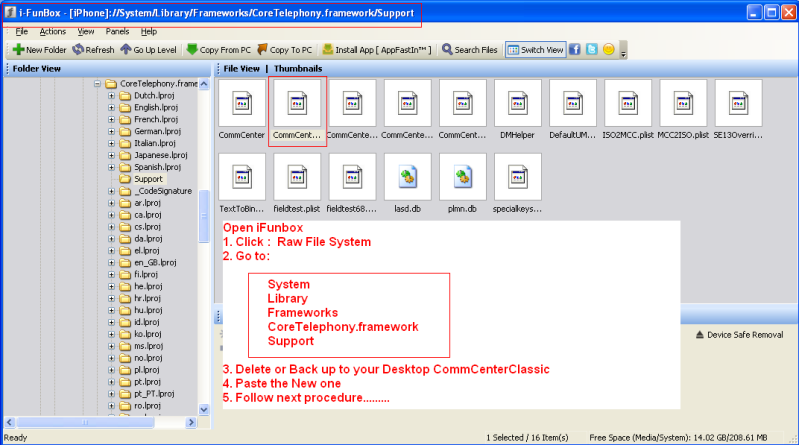
SCREEN SHOT:
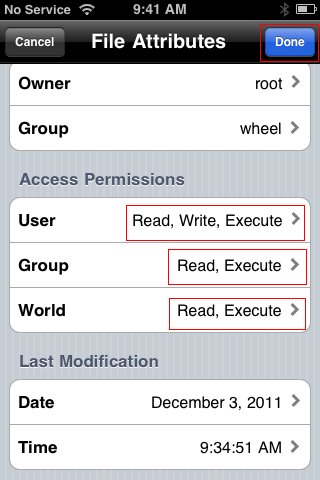
3. Open iFile
Go to :
>System/Library/Frameworks/CoreTelephony.framework/Support/commcentreclassic
>Click the Blue arrow next to the file name
3. Open iFile
Go to :
>System/Library/Frameworks/CoreTelephony.framework/Support/commcentreclassic
>Click the Blue arrow next to the file name
 |
>Go to Access Permissions
>SET the Following:
User : Read, Write, Execute
Group : Read, Execute
World : Read, Execute
>Tap Done
4. Install Ultrasn0w from Cydia and reboot your device
Note: 5.0.1 is still tetheredon new bottrom and iPhone 4
Finish Product:

I Only tried and Test it on iPhone 3GS
iPhone 4 User same procedure.
Finish Product:
I Only tried and Test it on iPhone 3GS
iPhone 4 User same procedure.


Subscribe to:
Posts (Atom)
All About Mobiles Headline Animator


